Design & Development, Quality & Testing, Regulation & Standards
Common Design Control Failures in Medical Device Development—and How to Prevent Them
Updated
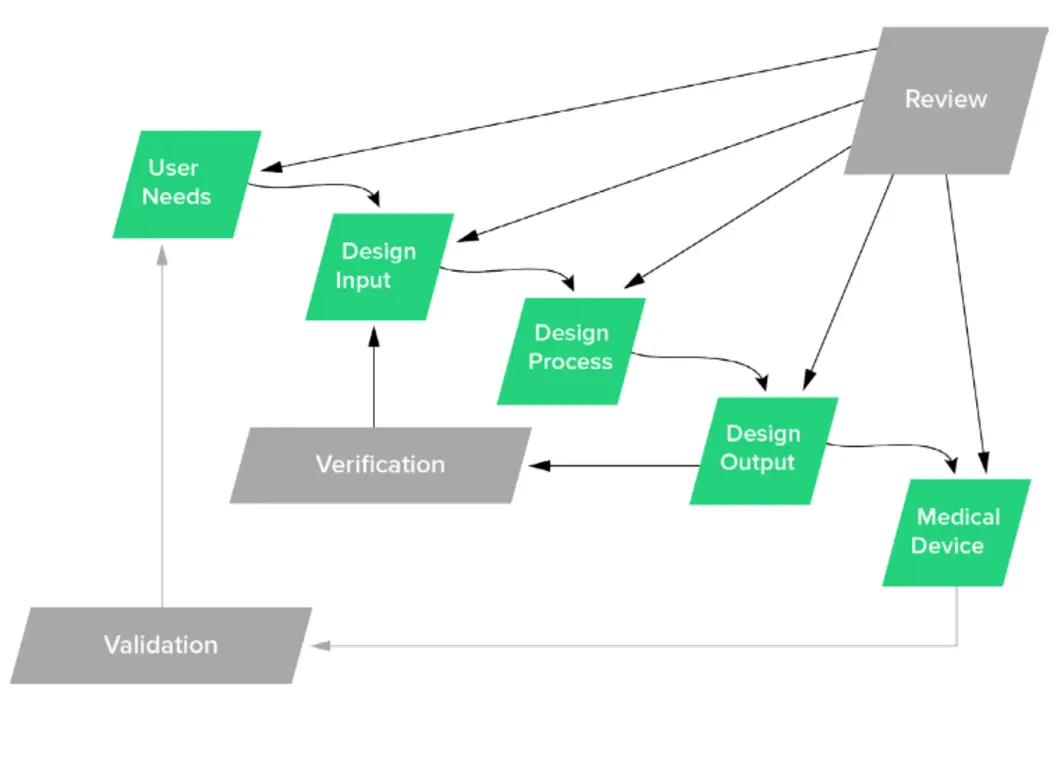
Design controls fail most often not because a team lacks documents, but because the documents are disconnected from daily development decisions. Requirements sit in one system, risks in another, test results in shared folders, and late changes are handled through informal conversations. By the time the device reaches verification, validation, transfer, or submission preparation, the gaps become expensive.
The practical answer to medical device design control implementation problems is to make controls part of how the team develops the product from the start. The aim is not to create paperwork after each milestone. It is to maintain a clear, reviewable chain showing why the device was designed as it was, how risks were controlled, and what evidence supports its safety and performance.
1. Starting design controls after the design is already taking shape
A common pattern is to treat feasibility work as entirely outside the quality system, then start design controls once management decides the concept is commercially viable. Some exploration is necessary before a concept is selected. The problem begins when teams continue making product-defining decisions without recording the intended use, key user needs, risk assumptions, and rationale.
Later, the team has to reconstruct the history: which requirement drove a feature, why a material was selected, what prototype was used to make a decision, and whether a risk was considered at the time. Retrospective documentation can look complete while failing to reflect how the design actually evolved.
Prevent it with an early, proportionate plan
Start formal controls when the work moves from open-ended research toward development of a marketable device. The level of formality can grow with the project, but several foundations should be in place early:
- A design and development plan defining scope, responsibilities, interfaces, deliverables, review points, and records.
- A preliminary intended use, indications where applicable, user groups, use environments, and foreseeable misuse.
- An initial risk-management approach that identifies known hazards and uncertainties needing investigation.
- A controlled method for approving requirements, recording design decisions, and changing the plan.
- A clear definition of what prototypes may be used for feasibility, verification, validation, or process development.
The plan should not be a static project schedule. It should identify how engineering, clinical or usability specialists, quality, regulatory, manufacturing, suppliers, and software teams interact. Update it when the project changes. A plan that says who owns design inputs, risk controls, test protocols, and transfer deliverables prevents gaps caused by assumed ownership.
2. User needs that never become testable design inputs
User needs are often written at the wrong level. Statements such as “easy to use,” “portable,” “accurate,” or “safe” are useful starting points, but they cannot be verified directly. At the other extreme, teams may begin with detailed engineering specifications without documenting the user or clinical need behind them.
Both approaches create traceability problems. A test may prove that a specification was met, while the device still fails to address the original use scenario. Or a team may claim a user need has been addressed without defining measurable acceptance criteria.
Translate needs in layers
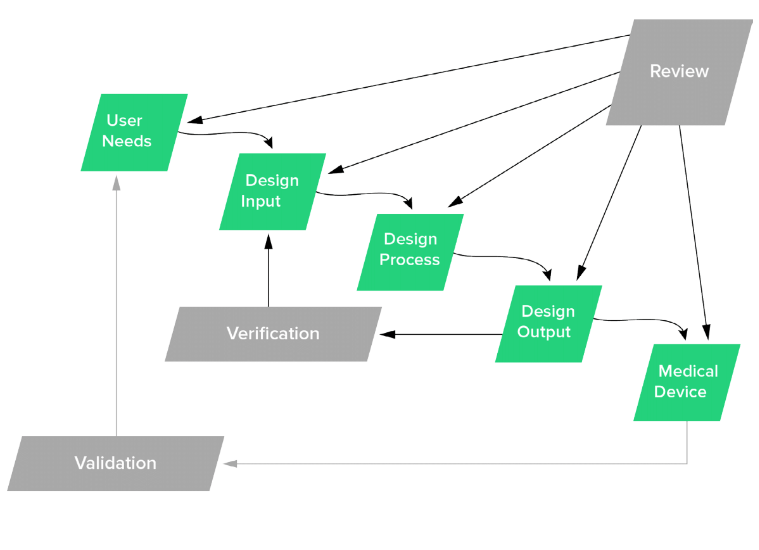
Build a structured path from use to evidence:
- User need: What must a defined user be able to do, in a defined environment, for the intended patient or procedure?
- Design input: What measurable safety, performance, usability, regulatory, or risk-control requirement follows from that need?
- Design output: What drawing, specification, software requirement, material specification, manufacturing instruction, label, or inspection method implements the input?
- Verification evidence: What inspection, analysis, or test confirms that the output meets the input?
- Validation evidence: What evidence shows the finished device meets the user need and intended use under actual or simulated use conditions?
For example, “a clinician must be able to identify an alarm condition during normal use” is a user need. It may lead to inputs for alarm audibility, visual indication, response time, labeling, and usability. The outputs may include hardware specifications, software logic, label artwork, and test methods. Bench testing can verify alarm level and timing. Validation can assess whether representative users recognize the alarm and take the expected action in representative conditions.
Avoid writing inputs that combine several conditions into one vague requirement. “The device shall be safe, easy to use, and resistant to cleaning agents” cannot be tested as one item. Separate the requirements and assign clear acceptance criteria, units, tolerances, and applicable conditions.
3. Treating traceability as a spreadsheet to finish before an audit
A traceability matrix assembled near the end of development usually exposes missing links rather than solving them. Rows are forced to match tests after the fact, requirements are rewritten to fit available evidence, and unresolved risk controls become difficult to see.
Traceability should be bidirectional. A team needs to move forward from a user need to the associated requirements, outputs, and evidence. It must also be able to move backward from a test failure, complaint trend, supplier change, or revised component to every impacted requirement, risk, and record.
Maintain a living traceability structure
At a minimum, maintain links for these paths:
| Starting point | Required connections |
|---|---|
| User need | Design input, validation evidence |
| Design input | Design output, verification evidence |
| Hazard or hazardous situation | Risk control, requirement or output, verification of the control |
| Use-related risk | Usability requirement, labeling or training control, validation evidence |
| Design change | Impacted requirements, outputs, risks, tests, labels, manufacturing documents, and released records |
Use stable identifiers rather than relying on requirement wording. If a requirement changes, preserve revision history and assess the impact of that change; do not simply overwrite the old text and leave obsolete evidence linked to the new revision.
A spreadsheet can work for a small, stable project if access, review, revision control, and link maintenance are disciplined. More complex products, software-intensive systems, and frequent changes often need a controlled requirements or quality system tool. The tool itself is not the control. The control is the team’s ability to show complete, current links and act on them.
4. Design reviews that are status meetings in disguise
A meeting called a “design review” does not necessarily provide design control evidence. Status meetings often focus on schedule, budget, open tasks, and prototype progress. Those subjects matter, but they do not replace a structured review of whether the design is adequate for its stage.
Weak reviews commonly have no defined inputs, no independent perspective, no documented concerns, and no evidence that actions were closed. They may approve a phase despite unresolved issues that directly affect safety, intended use, verification, or manufacturability.
Make reviews decision-focused
Schedule formal reviews at points where decisions are still practical to change: after defining user needs and intended use, after major design inputs, before committing to architecture or detailed design, before verification, before validation, before transfer, and after significant changes. The number and timing should fit the device and its risks.
For each review, document:
- The design stage, scope, and records reviewed.
- Required attendees and relevant independent reviewers.
- Decisions, concerns, action owners, and due dates.
- Whether open issues prevent progression, and why.
- Evidence that critical actions were completed or formally accepted with rationale.
Ask questions that force technical decisions: Are all major risks addressed by controls? Are inputs complete and testable? Do outputs provide sufficient information to build and inspect the device? Are verification methods appropriate? Is the planned validation representative of actual users and use conditions? Can production reliably reproduce the validated configuration?
5. Confusing verification with validation
Verification confirms that design outputs meet design inputs. Validation demonstrates that the finished device meets user needs and intended use. Teams may run extensive bench tests and call the package “validation,” even though no evidence shows that representative users can safely use the product in expected conditions.
The reverse error also occurs: usability feedback or clinical evaluation is used to claim that an engineering requirement was met, without objective verification of the specified limit.
Plan evidence before the final design is locked
Create verification and validation strategies while inputs and outputs are being defined. For every requirement, identify the appropriate method: test, inspection, analysis, or another justified method. Establish acceptance criteria before reviewing results. A protocol should identify the configuration tested, methods, equipment where relevant, sample rationale, deviations, results, and conclusion.
For validation, confirm that the device configuration is representative of the device intended for release, including relevant packaging, labeling, accessories, software version, and production-equivalent characteristics. Select users who represent the defined user populations and evaluate use conditions that reflect the intended environment. Simulated-use studies can be suitable when they adequately represent the use scenario, but convenience demonstrations by the development team are not meaningful validation.
Risk management should drive the test strategy. A risk control is not complete just because it appears in a risk file. The team needs evidence that the control was implemented and that it performs as intended. For use-related hazards, validation may be needed to show that users understand and can apply the control.
6. Freezing documents instead of managing iterative development
Development is iterative. Usability work may reveal that an early user need was incomplete. Verification may reveal that an output cannot consistently meet an input. A supplier change may alter material properties, dimensions, or manufacturing capability. Treating each stage as permanently frozen encourages teams to hide or minimize information that should trigger a revision.
The answer is not uncontrolled change. It is controlled iteration: revise the affected records, assess consequences, obtain appropriate review and approval, and repeat work where necessary.
7. Handling post-release changes as a document update
After release, a change to a component, software version, sterilization provider, packaging configuration, supplier, process parameter, or labeling can affect the validated device. A change request that only asks whether drawings were updated is too narrow.
Require a cross-functional impact assessment
Before implementation, assess effects on:
- Intended use, claims, user needs, and labeling.
- Design inputs, outputs, and their traceability.
- Hazards, hazardous situations, risk controls, and residual-risk evaluation.
- Verification and validation evidence, including the need for partial or full re-testing.
- Manufacturing processes, inspection methods, equipment, suppliers, and process validation.
- Regulatory submissions, registrations, technical documentation, and released records.
- Complaints, service data, nonconformances, and other post-market information that may have initiated the change.
State the rationale for the testing decision. “No testing required” is not a conclusion by itself. The record should explain why the change does not affect relevant safety, performance, usability, compatibility, or manufacturing characteristics.
A practical recovery plan for an existing project
Teams that discover gaps late should resist the temptation to generate missing documents quickly. First, perform a targeted gap assessment against the actual design history. Map the current intended use, user needs, inputs, outputs, risks, tests, reviews, and changes. Mark unsupported links, ambiguous requirements, obsolete records, and test evidence from non-representative configurations.
Then prioritize by patient and user risk, regulatory impact, and the likelihood that a change would alter conclusions. Reopen requirements or risk analyses when evidence shows they are incomplete. Conduct focused reviews, document decisions and rationale, and run additional verification or validation where justified.
Well-run design controls do not eliminate design changes or failed tests. They make the consequences visible early enough for the team to make informed decisions. When requirements, risks, outputs, reviews, and evidence remain connected throughout development and after release, compliance work becomes a by-product of a controlled engineering process rather than a late documentation exercise.