Regulation & Standards, Quality & Testing, Design & Development
Preventing UDI Compliance Data Errors in Labels and GUDID Records
Updated
A UDI problem is rarely limited to a barcode that will not scan. A wrong device identifier, an unplanned duplicate record, or a mismatch between the label and the Global Unique Device Identification Database (GUDID) can break the connection among the manufacturer, distributor, hospital item master, electronic health record, billing workflow, and recall process.
The practical objective is simple: each packaged device should resolve to one accurate device identity, and the production information on that package should be readable, usable, and consistent with the data systems that depend on it. Achieving that objective requires controlled identifier assignment, label design, database governance, and change control.
Start with a controlled UDI data model
For US FDA UDI purposes, the UDI has two main components:
- UDI-DI (Device Identifier): the fixed identifier for a specific device version or model and, where applicable, its packaging configuration.
- UDI-PI (Production Identifier): the variable production data carried when applicable, such as lot or batch number, serial number, expiration date, manufacture date, or donation identification number.
The UDI-DI is the key that connects a physical product to its GUDID record. GUDID does not hold individual lot or serial records. Instead, the labeler submits the DI record and indicates which PI attributes appear in the UDI on the label.
That distinction prevents a common design error: treating the DI as a general product family number while relying on lot or serial data to distinguish commercially different products. The DI must identify the device at the level required by the applicable UDI rules and issuing-agency assignment rules. A PI manages production-level traceability; it is not a substitute for assigning a new DI when a change triggers one.
Create one controlled source record for every sellable configuration. At minimum, it should connect:
- Internal product code and catalog or reorder number
- Brand name and device description
- Version or model number
- UDI issuing agency and issued DI
- Packaging level and quantity
- UDI carrier data string and human-readable text
- PI attributes used on the label
- GUDID record status and publication status
- Label artwork revision and effective date
- Market, legal manufacturer or labeler, and responsible data owner
Do not maintain this information independently in artwork files, spreadsheets, enterprise resource planning systems, regulatory files, and submission tools without a reconciliation process. Multiple uncontrolled copies are a frequent source of UDI compliance data errors.
Assign DIs before label artwork is released
UDI assignment should be a defined design-transfer and product-release activity, not a final packaging task. The team needs a decision process for determining whether a device change needs a new DI, an update to an existing record, or no UDI change.
FDA requirements and issuing-agency rules both matter. DI assignment decisions may be triggered by changes to identifying characteristics, device version or model, packaging quantity, sterilization status, labeling claims, or other attributes. The exact assessment depends on the device and the rules in force. Build the decision into formal change control rather than asking the question after revised labels have already been printed.
Use a DI assignment register
A DI register should have a unique record for each DI, with status controls such as proposed, approved for artwork, commercially active, discontinued, and retired. Restrict the ability to create or alter a DI to named roles. Require review by regulatory, labeling, master-data, and supply-chain representatives before release.
Useful automated checks include:
- The DI cannot be assigned to more than one active sellable configuration.
- A proposed DI cannot duplicate a DI already used by the organization or imported from an acquired portfolio.
- Each package level has a defined quantity and its own applicable identifier.
- The issuing-agency format and check-digit rules pass validation.
- The printed human-readable DI matches the encoded DI exactly.
- A GUDID record is linked to the same controlled product revision as the approved label.
This is particularly important after mergers, divestitures, private-label arrangements, relabeling, or distributor changes. A product can acquire multiple identifiers when ownership and item-master data are migrated without a clear decision about which party is the FDA labeler and which record remains active.
Avoid duplicate primary DIs
Hospitals expect a dependable one-to-one relationship between the product they receive and the identifier used in their item master. Multiple active primary identifiers for the same packaging level can produce duplicate matches, failed replenishment rules, inaccurate utilization records, and billing exceptions.
Before introducing a new DI, search internal legacy records, GUDID, label archives, distributor files, and contract catalogs. If an existing product is being transferred to a new legal entity or renamed, do not assume a new DI is automatically required. Assess the specific regulatory and issuing-agency rules, document the decision, and communicate the transition to trading partners.
Where a correction is needed, preserve the record history. Do not overwrite a controlled identifier or silently reuse a discontinued DI for a different product. A clear audit trail helps distinguish a data correction from a genuinely new device configuration.
Design the label for the person scanning it
A compliant carrier that is difficult to locate, damaged in normal handling, or confused with several other barcodes still creates operational risk. Label layout should support warehouse receiving, operating-room use, bedside documentation where relevant, and manual fallback.
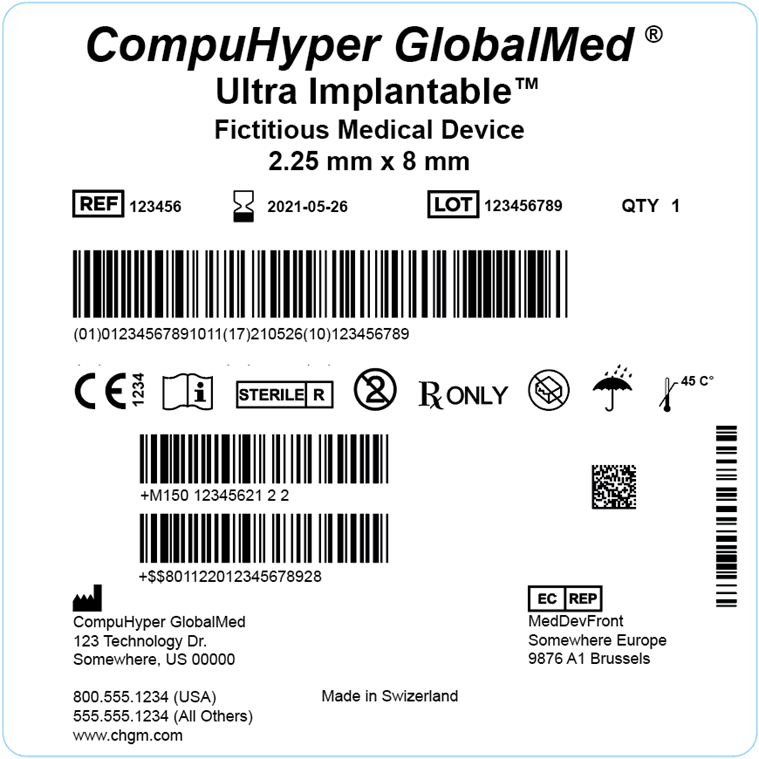
Give the UDI carrier a clear place on the label
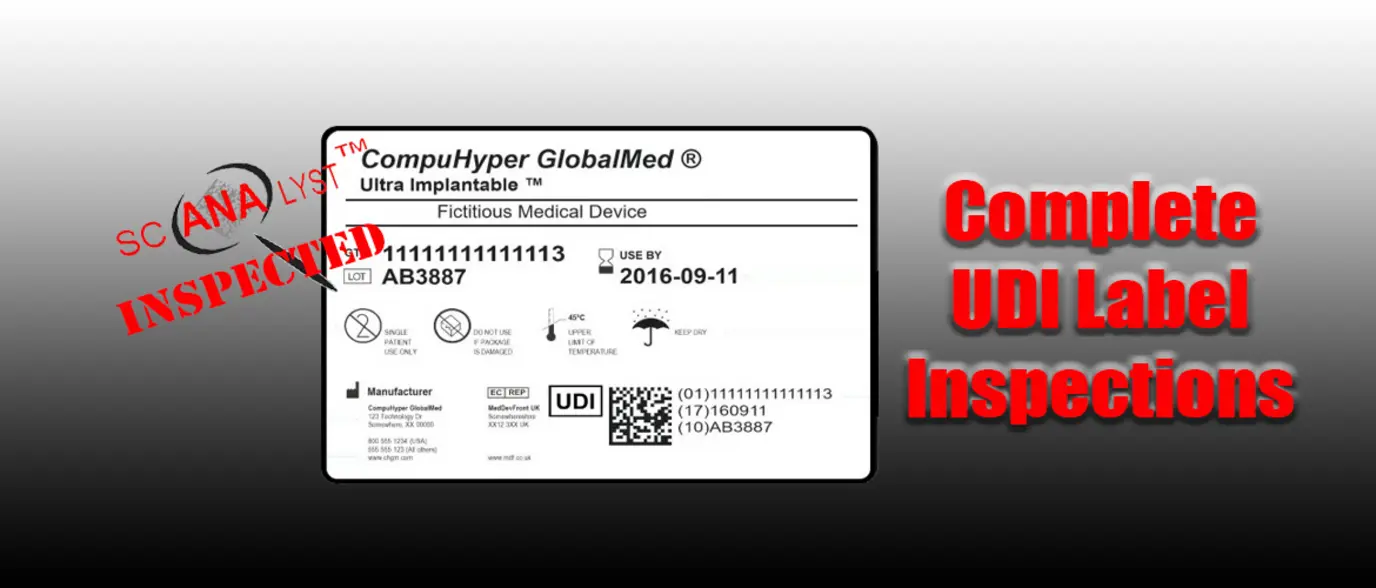
Keep the UDI carrier close to its human-readable interpretation and identify it clearly in the label hierarchy. Avoid placing it where it will be covered by an overlabel, folded around a package edge, distorted by a thermoformed surface, or obscured by glare.
If the package carries multiple barcodes, make their purposes obvious. A shipping-container barcode, an internal manufacturing code, and a UDI carrier can all be technically readable while leaving a user unsure which barcode to scan. Where the selected issuing-agency standard permits the required data to be encoded in one carrier, a consolidated carrier may reduce this ambiguity. Do not add separate codes simply because different systems consume different fields; scanner and software configuration may be able to parse the data elements from the UDI string.
The carrier type must fit the available space, data content, printing process, and intended scanning environment. Linear symbols can be suitable where label space and print quality support them. A two-dimensional symbol, such as DataMatrix where supported by the chosen standard, may be more practical for small packages. The choice is not only a graphic-design decision.
Verify the production label, not just the artwork proof
Barcode verification should evaluate printed production samples under the relevant issuing-agency and symbol-quality requirements. A scanner reading one pristine proof is useful, but it is not a substitute for verification of print quality.
Include representative worst-case samples where appropriate: the smallest permitted symbol, the end of a print run, variable PI content at its longest expected length, and packaging that has undergone the intended sterilization, sealing, or distribution process. Confirm that the scanner output matches the approved encoded data string.
Human-readable interpretation is equally important. Review it character by character against the DI register and the variable-data source. Transposed characters, missing leading zeros, and date-format confusion can be hard to spot in artwork review but can cause failed receiving or traceability records.
Validate GUDID data before submission and after publication
GUDID is a reference catalog used by providers, software systems, regulators, and supply-chain partners. A technically accepted submission can still be operationally poor if descriptions are vague, catalog numbers are absent, or attributes conflict with the label.
FDA guidance and the GUDID data reference materials should be the working specification for the submission. Use the current FDA requirements, not a legacy template or a previous product’s record, to determine mandatory attributes and allowable values.
Reconcile label, master data, and submission fields
Before submitting or changing a DI record, conduct a field-level comparison among:
- The approved final label and instructions for use, where relevant.
- The controlled product master record.
- The GUDID submission dataset.
- The device listing and other regulatory records that use overlapping identity information.
Focus review on fields that downstream users rely on to distinguish similar products. These commonly include brand name, version or model, catalog number, device description, package quantity, sterile status, single-use status, latex information, MRI safety information when applicable, and the production-identifier flags.
Catalog number and description may be especially useful to hospitals even where a field is optional. A catalog number provides a bridge between the manufacturer’s DI and the provider’s item master. A specific description helps users distinguish similar variants that differ in size, configuration, or intended use.
Do not copy marketing language into the description field if it hides the practical difference between records. A supply-chain or clinical user should be able to distinguish the product from nearby variants without guessing.
Use a four-part release check
A practical release check asks four questions:
| Check | Question to answer |
|---|---|
| Identity | Does the DI on the label match the approved DI register entry? |
| Encoding | Does the carrier decode to the intended DI and PI data elements? |
| Database | Does the submitted or published GUDID record match the controlled source data? |
| Use | Can a receiving or clinical system associate the DI with the correct item-master record? |
For small portfolios, this can be a documented review workflow. For large portfolios, build validations into product-information management, label-management, and submission processes. Automation should flag exceptions, not replace accountable review.
After publication, retrieve the record through the public GUDID access tools and compare it again with the released label. This final check catches errors introduced through manual entry, mapping, or a mismatch between web-interface edits and structured submissions.
Treat changes and corrections differently
Data maintenance is a lifecycle responsibility. When a label changes, the GUDID record must be assessed. When a change affects a DI-triggering attribute, issuing a new DI may be required rather than editing the existing record.
Define separate workflows for:
- Correction: fixing an error in a submitted record or label without changing the marketed device identity.
- Product change: changing a device or packaging attribute that may require a new DI and new record.
- Discontinuation: ending commercial distribution while retaining traceable historical information.
- Ownership or labeler transition: moving responsibility while controlling the impact on identifiers, records, and partner data.
Each workflow should identify who approves the action, who updates artwork and GUDID, how distributors and providers are notified, and what evidence is retained. Without this separation, teams may edit an old record to describe a new product, leaving historical scans tied to inaccurate data.
Connect UDI to hospital and supply-chain systems
A UDI program delivers limited value if it stops at label printing and a database submission. Providers need usable data for procurement, inventory, recalls, clinical documentation, and adverse-event reporting.
Give distributors, group purchasing organizations, and provider customers a current cross-reference that includes the DI, catalog number, package quantity, description, and effective date. During a transition, communicate old and new identifiers, the reason for the change where appropriate, and whether inventory bearing the earlier label remains valid for distribution.
Internally, map the DI to enterprise resource planning material numbers, manufacturing lots, complaint records, field actions, and recall procedures. For implantable devices, support the workflows that capture UDI in electronic health records and link the device to the patient record when required by the provider’s systems and applicable rules.
Periodically test the full path using a released package: scan the carrier, inspect the decoded data, find the GUDID record, locate the internal product record, and confirm the expected supply-chain or clinical workflow. This is more informative than reviewing each system in isolation.
Make UDI data governance part of the quality system
The strongest preventive control is clear ownership. Assign a business owner for device identity, a data steward for master data, and defined approvers from regulatory, quality, labeling, and operations. Establish an SOP that covers DI assignment, PI rules, artwork approval, barcode verification, GUDID submission, reconciliation, change control, and error escalation.
Track meaningful measures, such as duplicate-DI exceptions, first-pass submission errors, barcode verification failures, mismatches found after publication, and time to correct reported data issues. Review recurring defects for root cause. If the same errors appear in every new product launch, the problem is likely the template, mapping, or approval sequence rather than individual reviewer attention.
Accurate UDI data is not administrative cleanup. It is the common device identity that allows physical labels, regulated records, and healthcare systems to refer to the same product with confidence.